
Fronsky
Fronsky EFB screenshot 1
1 / 10
Fronsky EFB screenshot 1 enlarged

1 / 10

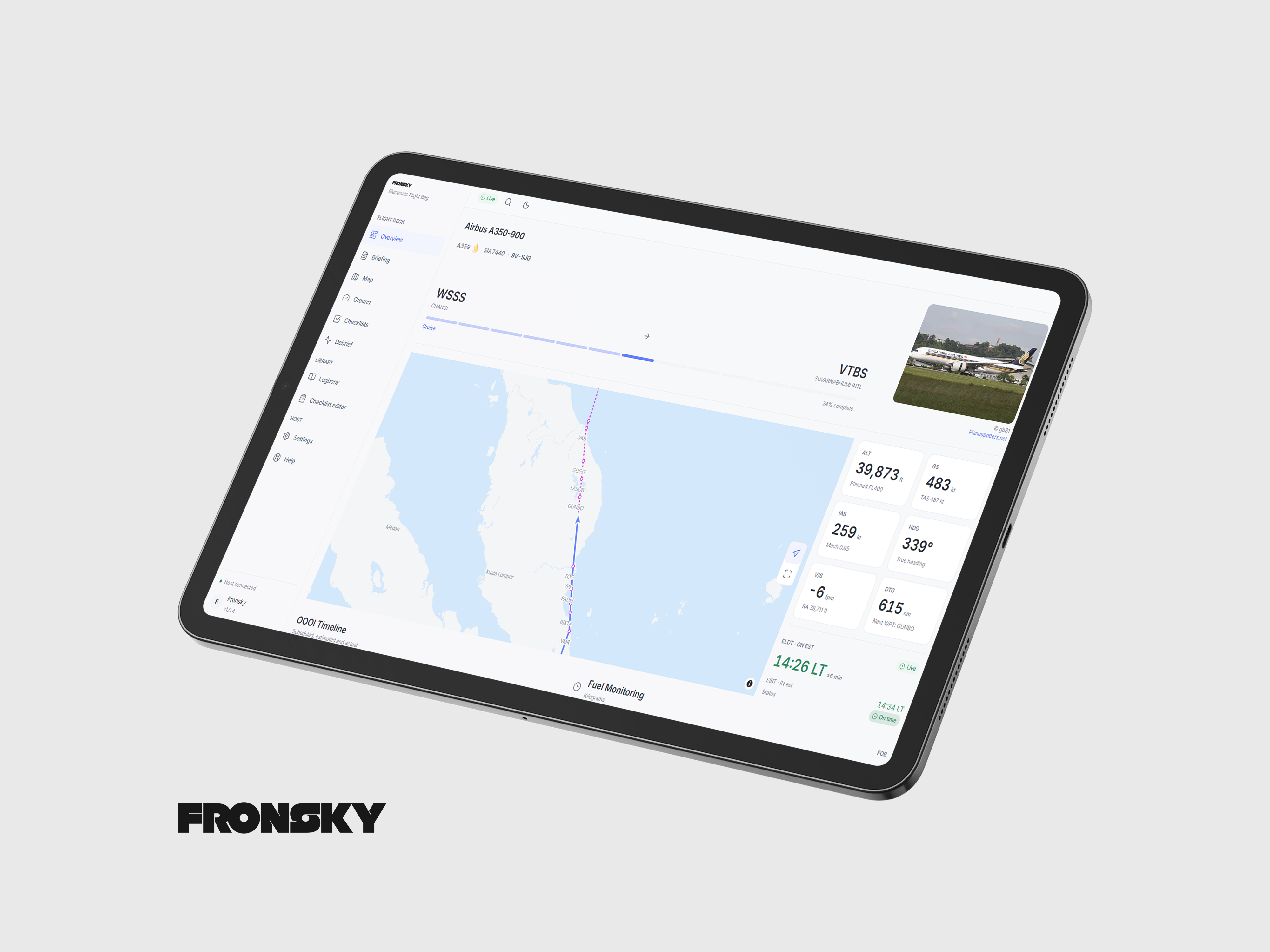
Fronsky EFB is a free Electronic Flight Bag that runs next to your simulator. It shows your live flight, imports your SimBrief plan, guides you through checklists and scores every landing, on your PC, in a browser or on an iPad.

Everything stays on your own computer. There is no account, no telemetry and no advertising. Your flights, logbook and settings are stored locally, and an active flight is never interrupted by an update.

πŸ–₯️ Requirements

  • Windows 10 or 11 (64-bit)
  • Microsoft Flight Simulator 2020 or 2024
  • FSUIPC7 running alongside the simulator (recommended). On MSFS 2024 the built-in SimConnect connection also works without it.
  • Optional: a free SimBrief account and a tablet or second PC on the same private network
  • Optional: Active Sky running on the same PC for live weather. Without it the simulator provides the weather, and your plan is the fallback.

πŸš€ Getting started

  1. Download and run the installer.
  2. Start Fronsky EFB. The first-run wizard checks the simulator, network and firewall.
  3. Start MSFS with FSUIPC7 running and load a flight.
  4. For an iPad or browser, scan the QR code shown in Settings.

The installer is not code-signed yet, so Windows SmartScreen may show a warning. Choose More info > Run anyway.

πŸ’¬ Support

Found a bug? Please report it in a discord forum by creating a topic, include the diagnostic bundle (Settings > Diagnostics) and your simulator version when staff creates a private ticket.

πŸ“„ Licence and credits

Β© 2026 Fronsky. All rights reserved. Fronsky EFB is freeware for personal, non-commercial flight simulation use. Redistribution, reupload, modification, reverse engineering or commercial use without written permission is not allowed. The Fronsky name and logos are trademarks of Fronsky. Provided "as is", without warranty of any kind.

Map data Β© OpenStreetMap contributors, tiles by OpenFreeMap. Aircraft photos by Planespotters.net photographers. Flight plans from SimBrief. Aircraft and airline names and logos are trademarks of their owners and are shown for identification only.

Fronsky EFB is an independent project, not affiliated with or endorsed by any company or product mentioned here. All names and trademarks belong to their owners. For flight simulation only, not for real-world navigation.

Release notes

v1.0.5current

11/17/2026, 4:30:00 PM17.7 MB7348896d737c48a60f92b799cb4b51c6d55426b163dd11d6303986023bd3e961
  • Print or save any checklist as a PDF from the Checklist Library, with the aircraft manufacturer logo in the header.
  • New compact layout, now the default: Overview fits a tablet without scrolling. Switch in Settings; remembered per device.
  • Choose a 12-hour or 24-hour clock in Settings.
  • Clearer flight-deck look for checklists: tabs, challenge and response, progress, Previous and Next.
  • Detailed airport charts on the map: runways, gates, stands and taxiways with their letters. They are stored, so they also show in the debrief and on every device.
  • Choose a Standard or Satellite map in Settings.
  • Built-in checklists rewritten for every aircraft and add-on: complete, in the right order, with short clear steps.
  • Enlarging the map keeps it inside the app and fills the page; the Map page fits the screen without scrolling.
  • Quitting no longer hangs or leaves a process behind, and a flight in progress continues on the next start.
  • Show your flight on your Discord profile; switch it off or limit it in Settings.
  • Smaller, more private diagnostic bundle with a short log of recent errors.
  • Choose per device whether it may change settings, and rename devices, in Settings.
  • Backups work with very large databases and are compressed; a damaged backup changes nothing.
  • The logbook no longer fills up with empty interrupted flights.
  • Delay and score are compared against your SimBrief plan times.
  • Your flight is saved automatically at every block event.
  • The map marks the top of climb as well as the top of descent, with times.
  • Fixed: the app no longer keeps reconnecting; it only looks for the Host while it is not connected.

v1.0.4

11/13/2026, 1:15:00 PM17.6 MB2651e2aa265ece79ffb53bada3b1f2edd094e0a067a8d0788c5e70193db0988b
  • Full support for many more add-on aircraft, each with its own recognition, type, registration and checklist.
  • More reliable aircraft recognition; the name always shows manufacturer and type.
  • Registration follows your selected livery and updates when you change it; manual corrections are remembered.
  • MSFS 2020 is now supported next to MSFS 2024, and Diagnostics shows which edition is connected.
  • Checklists no longer show false warnings about unknown variables.
  • The Briefing shows passengers, and the OFP PDF and Navigraph Charts buttons moved to the top.
  • Landing fuel is graded against a realistic target and judged at touchdown, so a long taxi no longer counts against it. The expected landing fuel is more accurate.
  • Every score item now fades out gradually instead of jumping between full, half and no points.
  • Touchdown distance and initial climb rate show real measured values.
  • Debrief charts show the exact time and value on hover.
  • Flight tracks are stored about ten times more compactly.
  • Fixed the "Importing a module script failed" error after an update.
  • After a restart following a landing, the flight stays in taxi-in.
  • The map marks the top of descent, and Overview shows the distance to the next waypoint.
  • More stable map and track: no stray lines, and simulator glitches can no longer cut your flight.
  • Release notes in Help scroll in their own area.
  • The diagnostic bundle includes your most recent flights.

v1.0.3

11/9/2026, 3:00:00 PM17.4 MB532d7088a06bbbdb02c24b09ac91350a517b7e8fe5ad2aeaab5227e133f9f3a1
  • Aircraft recognition is more reliable, also for add-ons that do not name their developer.
  • Pushback is detected reliably again, so the track starts at the gate.
  • The aircraft name shows manufacturer and type, never the add-on name, and no longer flickers.
  • Arrival counts up to 15 minutes early or late as on time.
  • Expected landing fuel no longer shows 0 kg when unreliable; it falls back to your flight plan.

v1.0.2

11/8/2026, 11:00:00 PM17.4 MBcca2eff8d59ce81c107a22fa0022b5276387bc01c55b4eed22a1fdd8154f68ff
  • Fixed the live flight view freezing because the app wrongly thought you were in the main menu.
  • Main menu detection is far more reliable and recovers automatically when it is wrong.
  • If you keep flying while the app is not tracking, the flight continues as the same flight and the gap is marked.

v1.0.1

11/8/2026, 9:00:00 AM17.4 MB0dd9dec670674dfc1891898616b08b6619161c83a6db0336016822506792b44f
  • Improved the connection to Microsoft Flight Simulator 2020 and 2024.
  • Fixed a wrong map track while in the main menu.
  • Step climbs and level changes no longer hurt your cruise score.
  • Smoother arrival status colours in dark mode.
  • Start minimized now really starts in the tray.
  • Help shows live release notes, with an Update button when a newer version is available.
  • Release details include the download size.

v1.0.0

11/3/2026, 9:00:00 AM17.4 MB93ad648a9a1fe5d39e3082a4f7fcf823d0519e1e427e46d5de4261e1cc481feb
  • First release.